



The official, ready-to-build Vue 3 storefront for Selldone shops. Customize every pixel, then publish it as your own Layout.
Documentation ·
Quick start ·
Live preview ·
Ecosystem ·
Selldone.com ·
Report an issue
Storefront · Page Builder · Components · Storefront SDK · Backoffice SDK · Vendor SDK · Community SDK · Core · CLI · Translate
Selldone Storefront is a complete, production-ready web app for the customer side of a Selldone® shop: home and landing pages, product listings with filters, product pages, basket and checkout, customer panel, blog, community, maps and more. It is built with Vue 3, Vite, Vuetify and the Selldone SDKs, and it is fully open source.
On Selldone, a custom storefront is called a Layout. A Layout is an independent web application that runs on Selldone's infrastructure. Selldone deliberately replaced traditional templates and plugins (and their instability, costs, security issues and bugs) with Layouts: you own the entire frontend, while the platform handles products, orders, payments, shipping, taxes, customers, hosting, CDN and SSL.
Use this repository to:
- Build a unique storefront for your own brand, with no backend code.
- Create Layouts for clients or niches (influencers, restaurants, subscription boxes…) and sell them.
- Learn the Selldone stack end to end: Core, SDKs, Components and Page Builder working together.
Every business has its own story, ethos and vision. Page builders are convenient, but their templates and predefined designs often keep a brand from shining in its full, authentic glory. That's why we've chosen to disrupt the status quo of e-commerce: by offering pre-made, fully open-source components, businesses can tailor their digital presence down to the finest detail, without the headaches of technical complexity. Because in uniqueness, there's power.
- Complete shopping journey: landing pages, listings, filters, product pages, comparison, basket, checkout, order tracking and customer panel.
- Every product type: physical, virtual, file, service and subscription products, plus marketplace (multi-vendor) offers.
- Conversion tools built in: cross-selling and upselling, smart suggestions, gift shopping, coupons, offers, cashback and lotteries.
- Visual pages: landing pages, menus and popups created with the Page Builder render automatically.
- Global by default: multi-language (about 100 languages via Translate), multi-currency and RTL support.
- PWA and native app ready: installable web app, plus a native-app login mode.
- Develop against real data: run locally against any live shop, or attach your dev server to a live website.
- One-command deploy: publish with the Selldone CLI and manage versions in the developer panel.
- AI-agent ready: an included agent kit guides AI coding assistants to redesign the storefront safely.
| Page | URL |
|---|---|
| Product page | https://marketplace.hanscristy.com/product/238246-gen-v-wireless-silver-metal-navy-coated |
| Landing page | https://marketplace.hanscristy.com/ |
| Product listing | https://marketplace.hanscristy.com/shop |
| Product filters | https://bigmart.me/printful-category |
Product page |
Checkout |
Dynamic listing view |
Product filters |
Cross-selling and upselling |
Smart suggestions |
Pickup |
Gift shopping |
Custom product layout |
|
Video guide: Getting started with the Storefront project

Prerequisites: Node.js (LTS), Git, and npm or Yarn. New to the toolchain? See Setting up the development environment.
1. Clone the project
gh repo clone selldone/storefront
cd storefront
2. Install the Selldone modules and packages
setup fetches the Selldone modules from GitHub (Git submodules), then you install the remaining packages.
# Yarn
yarn setup
yarn install --force

# npm
npm run setup
npm install --force
3. Start the development server
yarn serve # or: npm run serveOpen the address printed in the terminal, for example http://localhost:8080/. The storefront loads live data from
the sample shop configured in .env.
Two step-by-step articles:
- How to develop a storefront on a live website with live updates (Vue + Vite + Selldone)
- How to develop a storefront (PWA) with Vue + Vite + Selldone and test it on your PC with live data
The manifest defines your Layout when you publish it on Selldone:
{
  "deploy_server": "https://layouts.selldone.com",
  "deploy_path": "",
  "package": "sample-custom-storefront",
  "name": "My Storefront",
  "version": "0.0.22",
  "storefront": true,
  "backoffice": false,
  "description": null
}
Use a unique package id for your Layout and increase version on every deployment.
During development the project uses data from a real Selldone shop:
| Variable | Description | Example |
|---|---|---|
VITE_APP_SAMPLE_SHOP_NAME |
Your Selldone shop name, in the format my-shop-name. |
toysworld |
VITE_APP_SAMPLE_SHOP_CUSTOM_HOME |
First page of the storefront: blog, avocado, hyper, community, shop, map, a landing page ID (number), or null. |
3001 |
VITE_APP_SAMPLE_DEFAULT_CURRENCY / _COUNTRY / _LANGUAGE |
Defaults for the sample shop. | GBP / GB / en |
VITE_APP_SAMPLE_THEME_COLOR_* |
Theme colors (light, dark, deep dark, info). | "#70557E" |
VITE_APP_DEV_SERVER_HOST / _PORT / _HTTPS |
Dev server host, port and HTTPS mode. | localhost / 8080 / FALSE |
# ▃▃▃▃▃▃▃▃▃▃▃▃ Sample Storefront ▃▃▃▃▃▃▃▃▃▃▃▃
VITE_APP_SAMPLE_SHOP_NAME=toysworld
# Number: custom landing page number
VITE_APP_SAMPLE_SHOP_CUSTOM_HOME=3001

VITE_APP_SAMPLE_DEFAULT_CURRENCY=GBP
VITE_APP_SAMPLE_DEFAULT_COUNTRY=GB
VITE_APP_SAMPLE_DEFAULT_LANGUAGE=en

VITE_APP_SAMPLE_THEME_COLOR_LIGHT="#70557E"
VITE_APP_SAMPLE_THEME_COLOR_DARK="#000000"
VITE_APP_SAMPLE_THEME_COLOR_DEEP_DARK="#000000"
VITE_APP_SAMPLE_THEME_COLOR_INFO="#E91E63"

# ▃▃▃▃▃▃▃▃▃▃▃▃ Dev Server ▃▃▃▃▃▃▃▃▃▃▃▃
VITE_APP_DEV_SERVER_HOST=
VITE_APP_DEV_SERVER_PORT=
VITE_APP_DEV_SERVER_HTTPS=TRUE
The meta tags in index.html simulate the Selldone hosting environment (shop name, API endpoints, CDNs, defaults).
They are documented in INDEX.md and in the wiki page
Configuration.
- Load the storefront in native mode with the query
?native=true. - Log in from a native app with
/login?app=<custom URI of the app>.
Install the Selldone CLI globally and run it from the project folder:
npm install -g selldone-cli
selldone
The CLI signs you in, builds the project, packages it and uploads it as a new version of your Layout.


Manage your Layouts in the developer panel: selldone.com/developer/layouts. Prefer to host it yourself? See Deploy & Hosting.
This repository is the standard Selldone Vue 3/Vite Storefront and the starting point for business-specific
Layouts. The AI agent kit in .ai-agent is general and design-agnostic: it first turns the
merchant's business goals, audience, brand, page requirements, content and design references into an implementation
brief, then customizes this existing web app in any requested visual direction while preserving Selldone commerce
behavior.
Start with the repository AI agent entry point and the Storefront Builder skill. They guide discovery, design planning, implementation and regression checks against the existing Storefront. This is not a greenfield application or framework-migration specification: visual design is flexible, while the Vue application and its commerce contracts are the baseline.
When the requested scope also includes GitHub setup, dependency synchronization, a production build, packaging, authentication or publication as a Selldone Layout, follow the guarded AI workflow. Deployment is optional, must be explicitly requested, and must be independently verified.
| Directory | Purpose |
|---|---|
components/ |
Custom Vue components used by this storefront |
layouts/ |
Master layouts that define the overall UI structure (StorefrontLayout.vue) |
pages/ |
Application pages: listing, product, basket, blog, user, map, landing, POS, … |
router/ |
Vue Router configuration |
store/ |
Vuex store for application state |
lang/ |
i18n language files |
modules/ |
Selldone modules pulled in as Git submodules (core, SDKs, components, page builder, translate) |
Component prefixes: S* storefront, U* general UI, B* backoffice, C* community, L* landing builder.
Details: STRUCTURE.md and Project Structure.

| Module | Description |
|---|---|
| Selldone Core | Models, types and helpers to interact with Selldone servers. |
| Storefront SDK | SDK for building and managing the storefront interface. |
| Selldone Components | Pre-built, professional commerce components for storefront and backoffice. |
| Vendor SDK | SDK for vendors to integrate and manage their offerings. |
| Community SDK | Community features: posts, topics and discussions. |
| Selldone Page Builder | Build and render custom pages within the Selldone platform. |
| Translate | Translation files for the shop, dashboard and backend. |
Update all modules to their latest version:
git submodule update --init --recursive --remoteManage your business in the ready-made cloud dashboard on selldone.com, or build a completely bespoke management dashboard with the Backoffice SDK and Components.
Dashboard |
Products |
Orders |
Fulfillment |
Order timeline |
|
Build storefronts for different verticals and publish them on Selldone, or run your own SaaS on your servers. When you publish on Selldone, you can sell your Layouts with a one-time price or a subscription. For example, a developer can build a storefront designed for influencers and offer it for a monthly subscription on Selldone. Read more in Deploy & Hosting.
- Complete components migration (Vuetify 2 → 3)
- Change compiler from Vue CLI to Vite
- Publish components playground
- Publish full API & SDK docs
- Publish full Storefront docs
- Publish full Backoffice docs
- Laravel SDK to self-host the storefront
- Publish Flutter SDK
| Guide | What you'll learn |
|---|---|
| Start & Build Storefront | Clone, install, run and configure the project |
| Setting Up Development Environment | Install Node.js and Yarn on Windows, macOS and Linux |
| Configuration | manifest.json, .env variables and index.html meta tags |
| Project Structure | Folders, file naming and component prefixes |
| Develop on Live Website | Attach your local dev server to a live shop |
| Deploy & Hosting | Publish with the CLI, self-host, and SaaS strategies |
| Customize with AI Agents | Use the included agent kit to redesign the storefront |
| Storefront Translation | Languages and how to submit corrections |
| Hiring Guide | Plan, design and hire for a custom storefront |
| FAQ | Common questions and troubleshooting |
The Storefront is the top layer of the Selldone open-source stack. It brings the Core, the SDKs, the Components and the Page Builder together into one ready-to-ship app, and the CLI deploys it.
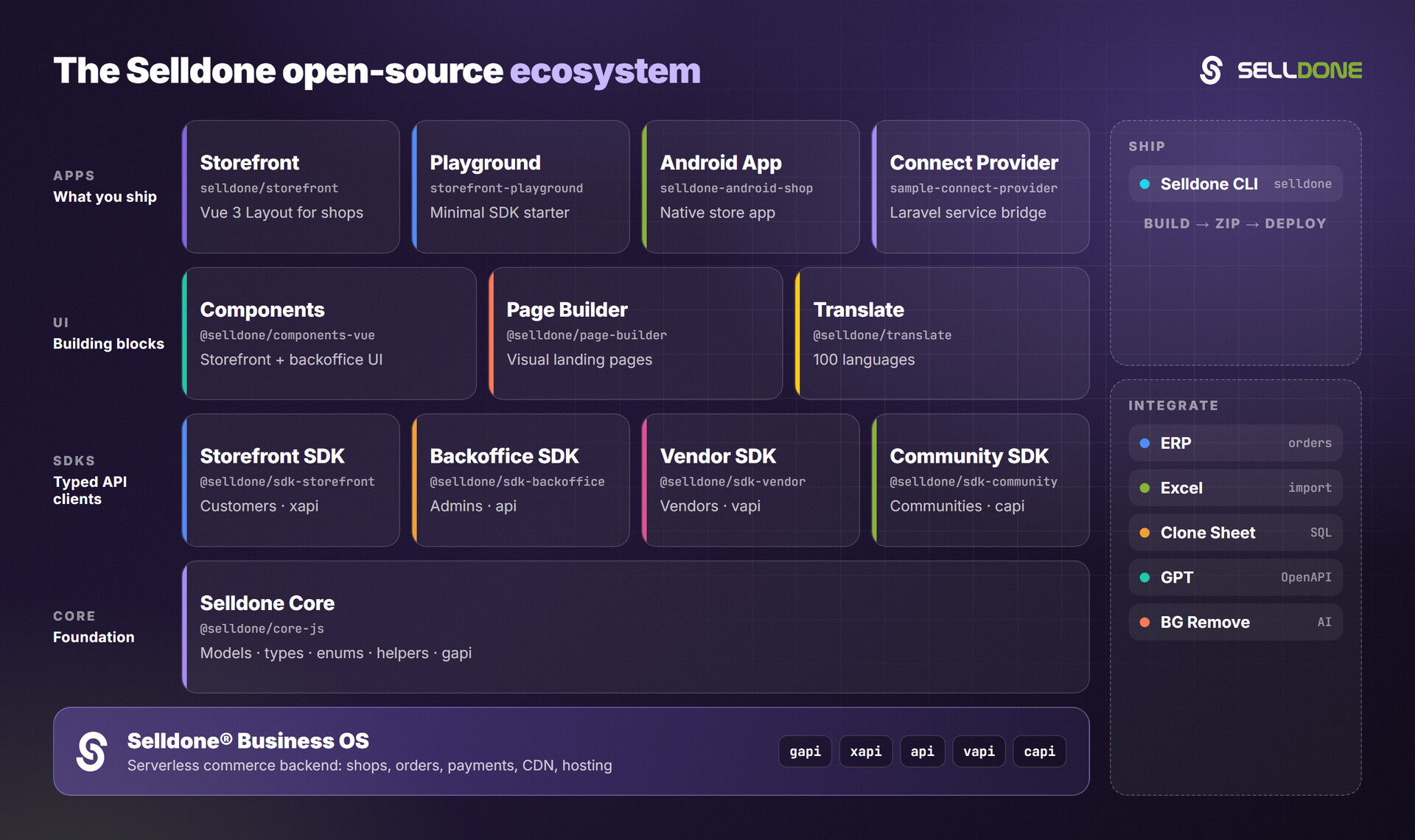
| Related project | Why you'd use it |
|---|---|
| Selldone CLI | Deploy this storefront to your shop |
| Storefront SDK | Build a storefront from scratch in any framework |
| Components | Reuse storefront and backoffice UI components |
| Page Builder | Design landing pages visually |
| Storefront Playground | A minimal SDK starter for learning |
| Translate | Add or correct storefront translations |
Contributions are welcome. Please read the organization contributing guide and the code of conduct. To work on the Selldone modules locally together with this project, see DEVELOPMENT.md.
Please do not report vulnerabilities in public issues. Email security@selldone.com. See SECURITY.md.
See LICENSE.md.
Selldone Ecosystem License Agreement
-
Scope of License: This license is granted exclusively for the use of the enclosed code (hereinafter referred to as "the Code") within the Selldone ecosystem. The licensee is authorized to use the Code solely in conjunction with services and applications that are part of, or directly related to, the Selldone ecosystem.
-
Commercial Use Restriction: The licensee is strictly prohibited from using the Code for any commercial purposes outside the Selldone ecosystem. Commercial utilization is permissible only when it is within the Selldone ecosystem and in accordance with the terms of this agreement.
-
Permission for Free Use: The Code may be used for non-commercial, free services, provided that explicit credit is given to Selldone. This credit must include the name "Selldone" prominently displayed on the user interface of the relevant service or application, along with a hyperlink to selldone.com.
-
No Redistribution: The licensee may not redistribute the Code, in whole or in part, to any third party outside the Selldone ecosystem, unless expressly authorized by Selldone.
-
No Modification for Redistribution: While modifications to the Code for personal or internal use within the Selldone ecosystem are allowed, the licensee may not modify the Code for the purpose of redistribution outside the Selldone ecosystem.
-
Termination: Failure to comply with the terms of this agreement will result in the immediate termination of the license and may subject the licensee to legal action.
-
Disclaimer of Warranty: The Code is provided "as is" without any warranties of any kind, either expressed or implied, including but not limited to implied warranties of merchantability or fitness for a particular purpose.
-
Limitation of Liability: In no event shall Selldone be liable for any damages arising out of the use or inability to use the Code.
-
Jurisdiction and Disputes: This agreement shall be governed by the laws of the jurisdiction where Selldone is established. Any disputes arising from this agreement shall be resolved in the courts of that jurisdiction.
By using the Code, the licensee acknowledges that they have read, understood, and agreed to the terms of this license.
Part of the Selldone® Business OS open-source ecosystem · selldone.com