



Pre-built Vue 3 commerce components for building white-label Selldone storefronts and dashboards.
Documentation ·
Quick start ·
Ecosystem ·
Selldone.com ·
Report an issue
Storefront · Page Builder · Components · Storefront SDK · Backoffice SDK · Vendor SDK · Community SDK · Core · CLI · Translate
Selldone Components (@selldone/components-vue) is the open-source Vue 3 components library behind
Selldone® Business OS. It contains the pre-built commerce UI used by Selldone storefronts and
by the merchant dashboard: product cards, baskets and checkout widgets, order tracking, payment forms, maps, charts,
uploaders, article editors, community pages and hundreds of back-office tools.
The library is built with Vue 3 and Vuetify 3 and talks to Selldone through the official SDKs (Storefront SDK, Backoffice SDK, Vendor SDK, Community SDK) and shared models from Core. Texts come from Translate, so components are available in about 100 languages.
Use it to build a custom storefront (a Selldone Layout), to extend the Selldone dashboard, or to reuse individual widgets in your own Vue app. The full Storefront project is the best reference for how the pieces fit together.
- Mode: Public
- Use case: Pre-built Vue commerce components for both storefront and back office
- Project type: Vue components library
- More than 1,000 Vue components — organized by audience in
storefront/,backoffice/,ui/,community/,article/andvendor/. - Clear naming convention —
S*storefront,B*back office,U*generic UI,C*community (andL*for the Page Builder), so you always know where a component belongs. - One-line setup —
createComponents()returns a Vue plugin that installs the core mixin, global components, directives and global helpers. - Commerce-ready storefront UI — product cards and pages, basket items, checkout and payment widgets, order status and delivery tracking, coupons, gift cards, wallets, lotteries, comparison, cookie consent and more.
- Back-office building blocks — products, inventory, orders, customers, vendors, campaigns, discounts, taxes, logistics, domains, spreadsheets import, AI assistance and dashboards.
- Payment UI — components for Stripe, PayPal Standard, Razorpay, Mercado Pago, Paymob, Square and more (
ui/payment). - Rich generic UI — charts (ApexCharts, d3), maps (Mapbox), date and time pickers, currency and price inputs, uploaders (FilePond), QR and barcodes, Lottie, rating, smart selects and more.
- Theming from your Layout — a ready Vuetify instance (
VuetifyInstance(i18n)) with Material and Font Awesome icon sets and theme colors read from meta tags. - Useful directives and services —
v-copy,v-track,v-dragscroll,v-size,v-dynamic-scripts,NotificationService,EventBusand shared mixins. - TypeScript source — shipped as
.tsand.vuesource files for tree-shaking with modern bundlers such as Vite.
Install the package:
npm install @selldone/components-vueyarn add @selldone/components-vueHere's a basic example to get you started:
import { createComponents } from "@selldone/components-vue/components";

const components = createComponents({});
app.use(components);
A typical storefront entry file also loads the icon fonts and uses the bundled Vuetify instance, as the Storefront does:
import { createApp } from "vue";
import { createComponents } from "@selldone/components-vue/components";
import { VuetifyInstance } from "@selldone/components-vue/plugins/vuetify/vuetify";
import { StorefrontSDK } from "@selldone/sdk-storefront";

// Icon fonts
import "@fortawesome/fontawesome-free/css/all.css";
import "@selldone/components-vue/style/fonts/material-design-fonts/material-design-icons.scss";

const app = createApp(App);
const vuetify = VuetifyInstance(i18n); // i18n = your vue-i18n instance

app.use(createComponents({}));
StorefrontSDK.Setup(); // window.$storefront for S* components

app.use(i18n);
app.use(router);
app.use(store);
app.use(vuetify);
app.mount("#app");Components are imported by path. The folder tells you the audience and the file name starts with the family prefix:
<template>
  <s-shop-product-card :product="product" />
  <u-price :amount="product.price" :currency="product.currency" />
</template>

<script lang="ts">
import SShopProductCard from "@selldone/components-vue/storefront/product/card/SShopProductCard.vue";

export default {
  components: { SShopProductCard }, // u-price is registered globally by createComponents()
  props: { product: Object },
};
</script>| Prefix | Folder | Audience | Examples |
|---|---|---|---|
S |
storefront/ |
Customer-facing storefront | SShopProductCard, SShopBuyButton, SShopBasketItemsList, SStorefrontSearchBox, SFooterSection, SCookieConsent |
B |
backoffice/ |
Merchant dashboard and admin tools | BProductAddFull, BOrderButton, BInventoryList, BCustomerAdd, BVendorAdd, BSpreadsheet |
U |
ui/ |
Generic UI usable anywhere | UPrice, UCurrencyInput, UDateInput, UMapView, UChartLine, ULottie, USmartSelect |
C |
community/ |
Community (posts, topics, comments) | CPostWidget, CPostEditor, CCommentsList, CCategoryCard, CLayout |
| — | article/ |
Blog and help articles | SArticleEditor, SArticleComments, SArticleFaqs, SArticleTableOfContents |
L |
pagebuilder | Page Builder (separate package) | LPageEditor, LPageViewer, LandingRender |
See Component Families for the full folder map.
CoreMixinas a global mixin (helpers such asUSER(),getShopImagePath(),getProductImage(),copyToClipboard(), language helpers).- Global components:
UCheck,u-price,ULoadingProgress,apexchart,u-qrcode,u-barcode,u-lottie,UButtonCircle,UTooltipTips,SWidget,UWidgetHeader, plus the notification, numerals, mask, flag-icon and confetti plugins. - Global directives:
v-copy,v-track,v-dynamic-scripts,v-dragscroll,v-size. - Global properties:
$SEO,GlobalRules,IMAGE_SIZE_SMALL,IMAGE_SIZE_BLOG,SUB_TOOLBAR_CONFIGandwindow.
Register your own components and directives in the same call:
app.use(
  createComponents({
    components: { MyBanner },
    directives: { focus: FocusDirective },
  }),
);VuetifyInstance(i18n) reads the primary and secondary colors from meta tags in your index.html:
<meta name="color--theme-light" content="#70557e">
<meta name="color--theme-dark" content="#3a2c41">
<meta name="color--theme-deep-dark" content="#261b2d">
<meta name="color--theme-info" content="#9964e3">
The values above are the defaults. See Theming and Styles.
import NotificationService from "@selldone/components-vue/plugins/notification/NotificationService.ts";

NotificationService.showSuccessAlert(null, "Saved successfully.");
NotificationService.showErrorAlert(null, "Something went wrong.");| Page | What you'll learn |
|---|---|
| Home | What the library contains and where it fits |
| Getting Started | Install, register and render your first component |
| Installation and Registration | Everything createComponents() installs, peer setup, custom registrations |
| Component Families | Folder structure, naming prefixes and notable components |
| Storefront vs Backoffice | Which SDKs and globals each family needs |
| Theming and Styles | Vuetify instance, theme colors, fonts and SCSS |
| Directives and Services | v-copy, v-track, v-dragscroll, v-size, notifications, event bus, mixins |
| FAQ | Common questions and troubleshooting |
| Contribution Guide | How to contribute and develop locally |
Components is the shared UI layer of the Selldone open-source stack. The Storefront and the Page Builder are built from it, it calls Selldone APIs through the SDKs, and it reads models and helpers from Core and texts from Translate.
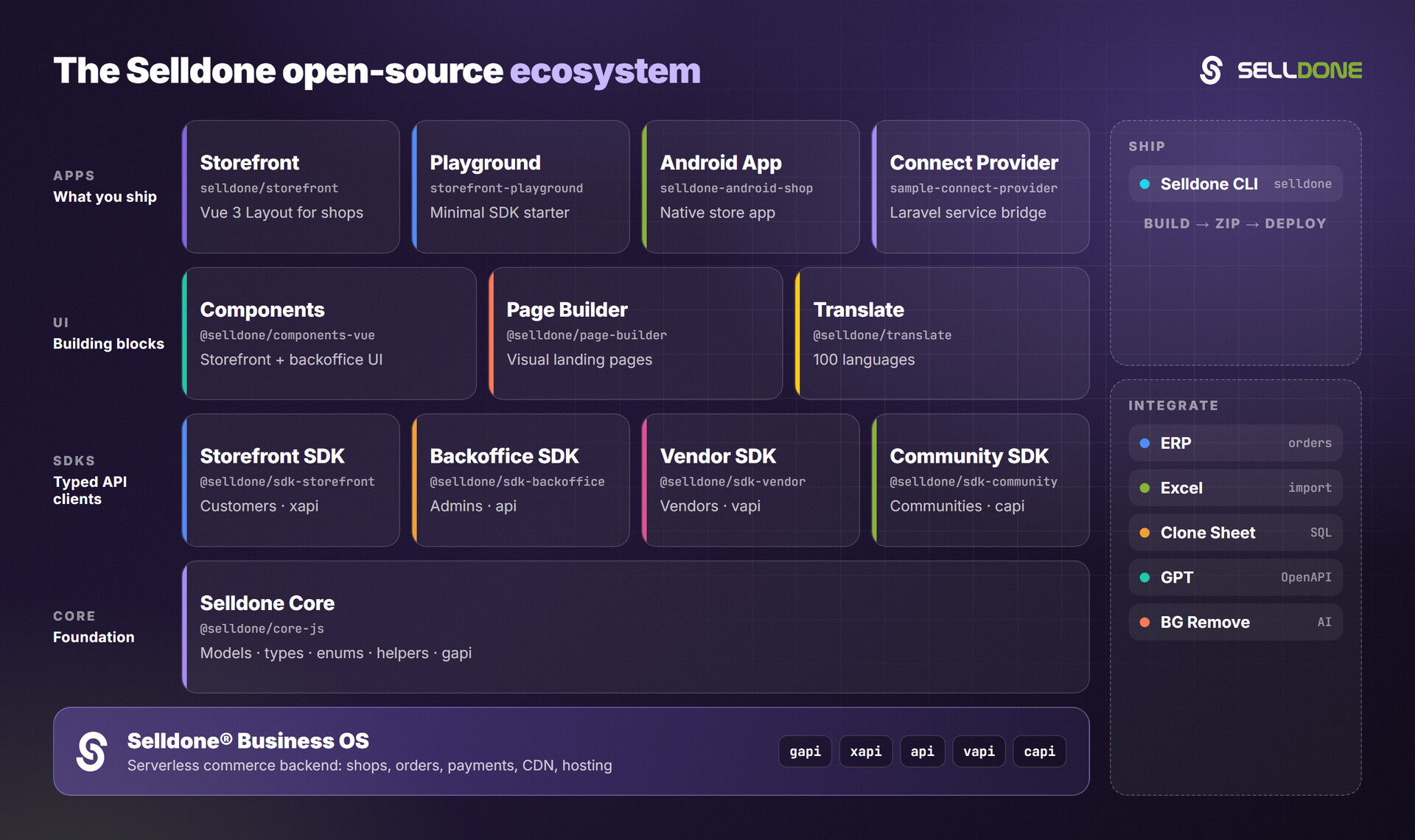
| Project | Why it matters here |
|---|---|
| Storefront | Full Vue 3 storefront built with these components (wiki) |
| Page Builder | Visual page builder that reuses these components (wiki) |
| Storefront SDK | window.$storefront API client used by S* components (wiki) |
| Backoffice SDK | window.$backoffice / window.API used by B* components (wiki) |
| Core | Shared models, enums and helpers |
| Translate | Translation files for about 100 languages (wiki) |
Contributions are welcome. Read the organization Contributing guide, the Code of Conduct and the contribution guide in the wiki.
For local development, link this library and the Selldone packages it depends on, as described in DEVELOPMENT.md:
# Link the library
yarn link

# Link other libraries to this project
yarn link "@selldone/core-js"
yarn link "@selldone/sdk-storefront"
yarn link "@selldone/sdk-backoffice"
yarn link "@selldone/sdk-community"
yarn link "@selldone/sdk-vendor"
yarn link "@selldone/page-builder"Please do not report security vulnerabilities in public issues. Follow the organization Security policy and email security@selldone.com.
The repository includes the MIT License file. The copyright notice and the Selldone Ecosystem License Agreement below are reproduced from the project documentation.
Copyright © 2023 Selldone®

All rights reserved. This software and associated documentation files (the "Software") are the property of Selldone®.
Selldone Ecosystem License Agreement
Selldone Ecosystem License Agreement
-
Scope of License: This license is granted exclusively for the use of the enclosed code (hereinafter referred to as "the Code") within the Selldone ecosystem. The licensee is authorized to use the Code solely in conjunction with services and applications that are part of, or directly related to, the Selldone ecosystem.
-
Commercial Use Restriction: The licensee is strictly prohibited from using the Code for any commercial purposes outside the Selldone ecosystem. Commercial utilization is permissible only when it is within the Selldone ecosystem and in accordance with the terms of this agreement.
-
Permission for Free Use: The Code may be used for non-commercial, free services, provided that explicit credit is given to Selldone. This credit must include the name "Selldone" prominently displayed on the user interface of the relevant service or application, along with a hyperlink to selldone.com.
-
No Redistribution: The licensee may not redistribute the Code, in whole or in part, to any third party outside the Selldone ecosystem, unless expressly authorized by Selldone.
-
No Modification for Redistribution: While modifications to the Code for personal or internal use within the Selldone ecosystem are allowed, the licensee may not modify the Code for the purpose of redistribution outside the Selldone ecosystem.
-
Termination: Failure to comply with the terms of this agreement will result in the immediate termination of the license and may subject the licensee to legal action.
-
Disclaimer of Warranty: The Code is provided "as is" without any warranties of any kind, either expressed or implied, including but not limited to implied warranties of merchantability or fitness for a particular purpose.
-
Limitation of Liability: In no event shall Selldone be liable for any damages arising out of the use or inability to use the Code.
-
Jurisdiction and Disputes: This agreement shall be governed by the laws of the jurisdiction where Selldone is established. Any disputes arising from this agreement shall be resolved in the courts of that jurisdiction.
By using the Code, the licensee acknowledges that they have read, understood, and agreed to the terms of this license.
Part of the Selldone® Business OS open-source ecosystem · selldone.com