













teal is a shiny-based interactive exploration framework for analyzing data. teal applications require app developers to specify:
- Data, which can be:
- CDISC data, commonly used for clinical trial reporting
- Independent datasets, for example from a
data.frame - Related datasets, for example a set of
data.frameswith key columns to enable data joins MultiAssayExperimentobjects which areRdata structures for representing and analyzing multi-omics experiments
tealmodules:teal modulesareshinymodules built within thetealframework that specify analysis to be performed. For example, it can be a module for exploring outliers in the data, or a module for visualizing the data in line plots. Although these can be created from scratch, manytealmodules have been released and we recommend starting with modules found in the following packages:teal.modules.general: general modules for exploring relational/independent/CDISC datateal.modules.clinical: modules specific to CDISC data and clinical trial reportingteal.modules.hermes: modules for analyzingMultiAssayExperimentobjects
A lot of the functionality of the teal framework derives from the following packages:
teal.logger: standardizes logging withintealframework.teal.code: handles reproducibility of outputs.teal.data: creating and loading the data needed fortealapplications.teal.widgets:shinycomponents used withinteal.teal.slice: provides a filtering panel to allow filtering of data.teal.reporter: allowstealapplications to generate reports.teal.transform: allows the creation of reproducible transform and merge module for teal applications.
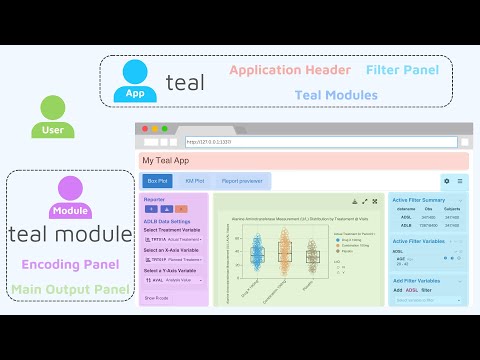
Dive deeper into teal with our comprehensive video guide.
Please click the image below to start learning:
teal is developed by Roche, Appsilon, and the wider open-source community.
Roche and Appsilon are copyright holders of the project, which is hosted in the pharmaverse GitHub organisation.
install.packages("teal")Alternatively, you might also use the development version.
# install.packages("pak")
pak::pak("pharmaverse/teal")library(teal)
app <- init(
data = teal_data(iris = iris),
modules = list(
module(
label = "iris histogram",
server = function(input, output, session, data) {
updateSelectInput(session = session,
inputId = "var",
choices = names(data()[["iris"]])[1:4])
output$hist <- renderPlot({
req(input$var)
hist(x = data()[["iris"]][[input$var]])
})
},
ui = function(id) {
ns <- NS(id)
list(
selectInput(inputId = ns("var"),
label = "Column name",
choices = NULL),
plotOutput(outputId = ns("hist"))
)
}
)
)
)
shinyApp(app$ui, app$server)
Please see teal.gallery and TLG Catalog to see examples of teal apps.
Please start with the "Technical Blueprint" article, "Getting Started" article, and then other package vignettes for more detailed guide.
If you encounter a bug or have a feature request, please file an issue. For questions, discussions, and updates, use the teal channel in the pharmaverse slack workspace.
This package is a result of a joint efforts by many developers and stakeholders. We would like to thank everyone who contributed so far!
teal was created at Roche and is developed together with Appsilon and the wider open-source community. Thank you to everyone who has contributed code, reported an issue, improved the documentation, or built a module. To get involved, explore the open issues or join the #teal channel in the pharmaverse Slack.