
Turn breadboard circuits into clear, shareable diagrams.


bkrender turns Breadkit circuits into
breadboard, schematic, and netlist views. Export SVG, HTML, images, PDF, or
animated assembly steps.

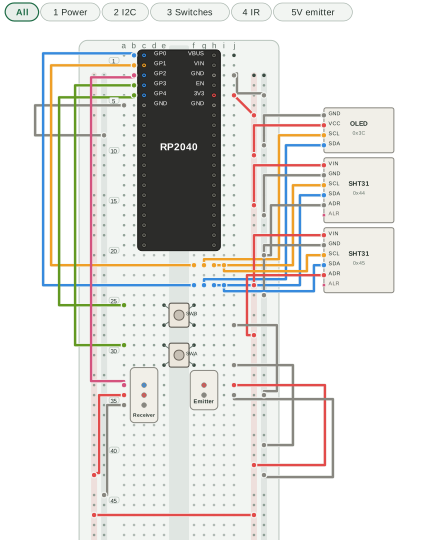
Open the interactive sensor demo
Install with Ruby 3.3 or newer:
gem install breadkit-render
bkrender circuit.bk.rb --theme dark -o circuit.svg
This README follows main (0.2.0), which requires Breadkit core 0.2.x. If the published gems are older, use sibling source checkouts:
git clone https://github.com/breadkit/breadkit.git
git clone https://github.com/breadkit/breadkit-render.git
cd breadkit-render
bundle install
bundle exec ruby exe/bkrender ../breadkit/examples/01_led_button.bk.rb -o circuit.svg
SVG works without a conversion backend. PNG, JPEG, WebP, PDF, and APNG need a supported backend; see the format and backend reference.
bkrender circuit.bk.rb --view schematic -o schematic.svg
bkrender circuit.bk.rb --view netlist -o netlist.svg
bkrender circuit.bk.rb -o circuit.html
The default breadboard view shows physical placement. The schematic groups pins by electrical connection; the netlist lists resolved nets. HTML adds interactive inspection. See the full command reference for layers, rail patterns, themes, annotations, assembly guides, animations, and output options.
The sensor demo source uses an RP2040, OLED, two SHT31 modules, switches, and IR modules. Its 5 V emitter layer is an alternative: disconnect the emitter's 3.3 V wire before using it. Keep the receiver at 3.3 V.
Ruby DSL files execute code; render only files you trust. JSON IR is data-only.
From the sibling checkout above, run bundle exec rake for the local checks.
MIT.