

A small program that installs everything hxcpp_JIT needs. It is included with hxcpp_JIT and will run automatically if any required component is missing.
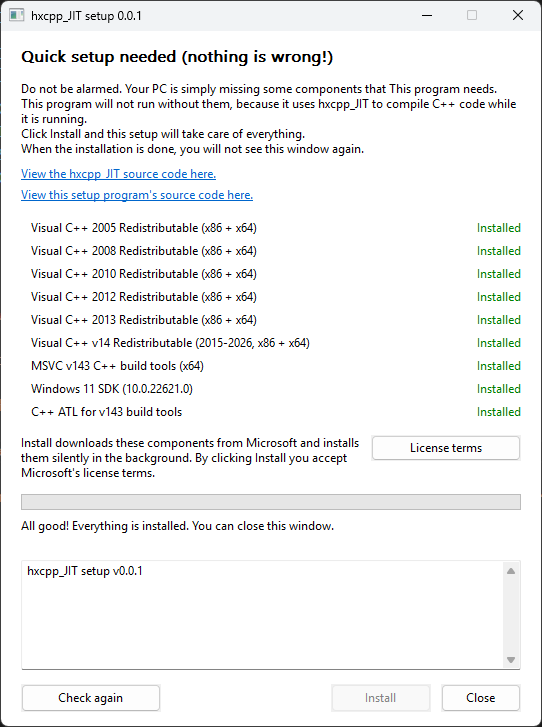
Any project that uses hxcpp_JIT will automatically include hxcpp_JIT_setup.exe when it is compiled. The setup program is embedded in the executable and will extract itself to %TEMP%\hxcpp_JIT\setup_<hash>.exe. The components are also downloaded there.
When the program starts, the setup initially runs silently in the background to check if any component is missing. If something is missing, the setup will open, temporarily hanging the main process and telling the user which components are missing.
The user can then press Install to install any missing components. When all components are installed, the program will automatically close and will not be shown to the user again.
The installed components are:
- Visual C++ 2005 Redistributable (x86 and x64)
- Visual C++ 2008 Redistributable (x86 and x64)
- Visual C++ 2010 Redistributable (x86 and x64)
- Visual C++ 2012 Redistributable (x86 and x64)
- Visual C++ 2013 Redistributable (x86 and x64)
- Visual C++ v14 Redistributable (x86 and x64)
- Visual Studio Community 2022
- MSVC v143 build tools (x64)
- Windows 11 SDK (10.0.22621.0)
- C++ ATL for build tools
All components are downloaded from Microsoft's official links.
hxcpp_JIT will run this program with the --quiet-unless-missing argument first. This runs the setup without showing a window. It returns 1 if any components are missing and 0 otherwise.
If the return code is 1, it will run the setup again with the --app [APP_NAME] argument, which opens the setup window. --app simply tells the setup what the program's name is.
There are other arguments, mostly for debugging purposes.
| Argument | Effect |
|---|---|
--version |
Prints the version (for example hxcpp_jit_setup 0.0.1) to the console it was started from and exits with 0. |
--check |
No window. Exits 0 if everything is installed, or 10 if something is missing. |
--auto |
Stays hidden if everything is already installed and shows the window only when something is missing. Returns either 0, 1, 2, or 3. |
--install-now |
Starts installing as soon as the check finishes and closes itself when done. |
| Code | Meaning |
|---|---|
0 |
Everything is installed |
1 |
Something is missing and no installation was attempted |
2 |
An installation was attempted, but something is still missing (or the installation failed) |
3 |
Everything is installed, but Windows needs a restart |
10 |
--check only, something is missing |
You need to have CMake, Visual Studio Community 2022, MSVC v143 build tools, and the Windows 11 SDK (10.0.22621.0) to build this.
Open x64 Native Tools Command Prompt for VS 2022 and run build.bat. The output will be hxcpp_JIT_setup.exe.
hxcpp_JIT_setup is licensed under the Apache License 2.0. See NOTICE for attribution.
This program does not contain any Microsoft software. It downloads the components listed above from Microsoft, and only after the user clicks Install. They are licensed to the user by Microsoft under Microsoft's own license terms.