


Fast class counting for NumPy arrays, PyTorch tensors, and GeoTIFFs.
pip install classcounterOptional backends:
pip install classcounter[torch]   # PyTorch support
pip install classcounter[geo]     # GeoTIFF support via rasterio
pip install classcounter[numba]   # Numba-accelerated backend
pip install classcounter[all]     # Everything
Requires Python 3.10+.
import numpy as np
from classcounter import count_classes

arr = np.random.default_rng(0).integers(0, 5, size=(100, 100), dtype=np.int32)

count_classes(arr)
# {0: 2017, 1: 1960, 2: 2050, 3: 1932, 4: 2041}

# Map class IDs to names
count_classes(arr, names={0: "water", 1: "forest", 2: "urban", 3: "crop", 4: "bare"})
# {'water': 2017, 'forest': 1960, 'urban': 2050, 'crop': 1932, 'bare': 2041}

# Get percentages instead of counts
count_classes(arr, percent=True)
# {0: 20.17, 1: 19.6, 2: 20.5, 3: 19.32, 4: 20.41}
Input arrays can be any shape — they are flattened internally. Negative integers and floats are supported via a np.unique fallback path.
Pass a boolean mask to count only the elements where it is True, e.g. only valid (non-nodata) pixels:
count_classes(pred, mask=valid)
count_classes(pred, mask=valid, percent=True)  # percentages of the valid pixels
The mask must have the same shape as the data or be broadcastable to it. A (rows, cols) mask covers every band of a (bands, rows, cols) raster. This gives the same result as count_classes(pred[valid]) without copying the selected elements. On GPU tensors it also avoids the host sync that boolean indexing forces.
count_classes("land_cover.tif")Requires the geo extra.
Write class counts back into the raster's GDAL metadata tags:
# One-liner: count and save in one step
count_classes("land_cover.tif", save_metadata=True)
# Writes tags: CLASS_COUNT_0=2017, CLASS_COUNT_1=1960, ...

# With percentages — automatically uses CLASS_PERCENT_ prefix
count_classes("land_cover.tif", percent=True, save_metadata=True)
# Writes tags: CLASS_PERCENT_0=20.17, CLASS_PERCENT_1=19.6, ...

# Custom prefix
count_classes("land_cover.tif", save_metadata=True, metadata_prefix="LAND_")
# Writes tags: LAND_0=2017, LAND_1=1960, ...
Or use the standalone function for more control:
from classcounter import save_counts_to_raster

counts = count_classes("land_cover.tif", names={0: "water", 1: "forest"})
save_counts_to_raster("land_cover.tif", counts)
# Writes tags: CLASS_COUNT_water=2017, CLASS_COUNT_forest=1960
Stale tags from previous runs are automatically cleared before writing.
import torch

tensor = torch.randint(0, 5, (100, 100))
count_classes(tensor)

tensor = tensor.to("cuda")  # GPU — counting happens on-device
count_classes(tensor)By default (backend="auto") the backend is chosen based on the input type:
- NumPy arrays → Numba (if installed), otherwise NumPy
- PyTorch tensors → PyTorch (runs on-device, including CUDA)
- File paths → loaded via rasterio, then counted with Numba/NumPy
Pass backend="numpy", "numba" or "torch" to force one, so behaviour doesn't depend on what else is installed. An error is raised if that backend isn't installed or doesn't accept the input ("torch" takes tensors; "numpy" and "numba" take arrays and file paths).
Numba compiles its kernels on first use and caches them on disk (in __pycache__ next to the package, or in NUMBA_CACHE_DIR if set), so only the first process pays the compile cost. If the package directory isn't writable, set NUMBA_CACHE_DIR to a writable location.
count_classes(data, names=None, percent=False, save_metadata=False, metadata_prefix=None, mask=None, backend="auto")
| Parameter | Type | Description |
|---|---|---|
data |
ndarray, Tensor, str, or Path |
Input array, tensor, or path to a raster file |
names |
dict[int, str] or None |
Optional mapping of class IDs to human-readable names |
percent |
bool |
Return percentages (0–100) instead of raw counts. Default False |
save_metadata |
bool |
Write results as GDAL tags in the source GeoTIFF. Only valid when data is a file path. Default False |
metadata_prefix |
str or None |
Custom tag prefix. Defaults to CLASS_COUNT_ or CLASS_PERCENT_ (when percent=True) |
mask |
bool ndarray, bool Tensor, or None |
Count only elements where the mask is True. Same shape as the data, or broadcastable to it. Default None (count everything) |
backend |
str |
"auto", "numpy", "numba" or "torch". Default "auto" |
Returns: dict[int | str, int] mapping class values (or names) to counts, or dict[int | str, float] when percent=True.
When names is provided, classes present in the data but missing from the mapping use their integer key (with a warning). Classes in the mapping but absent from the data receive a count of 0.
| Parameter | Type | Description |
|---|---|---|
path |
str or Path |
Path to an existing GeoTIFF file |
counts |
dict |
Dict of class counts as returned by count_classes |
prefix |
str or None |
Tag name prefix. Defaults to CLASS_COUNT_ |
Writes each entry as a GDAL metadata tag (e.g. CLASS_COUNT_0=1234). Existing tags matching the prefix are cleared before writing.
Benchmarks on a Ryzen 9 5950X with RTX 4090, 100M-element uint8 arrays:
| Backend | Time (ms) |
|---|---|
| NumPy (CPU) | 174 |
| Numba (CPU) | 2.8 |
| PyTorch CPU | 34 |
| PyTorch GPU (CUDA) | 1.5 |
The Numba backend runs on the CPU only. For GPU counting, pass a CUDA tensor to use the PyTorch backend.
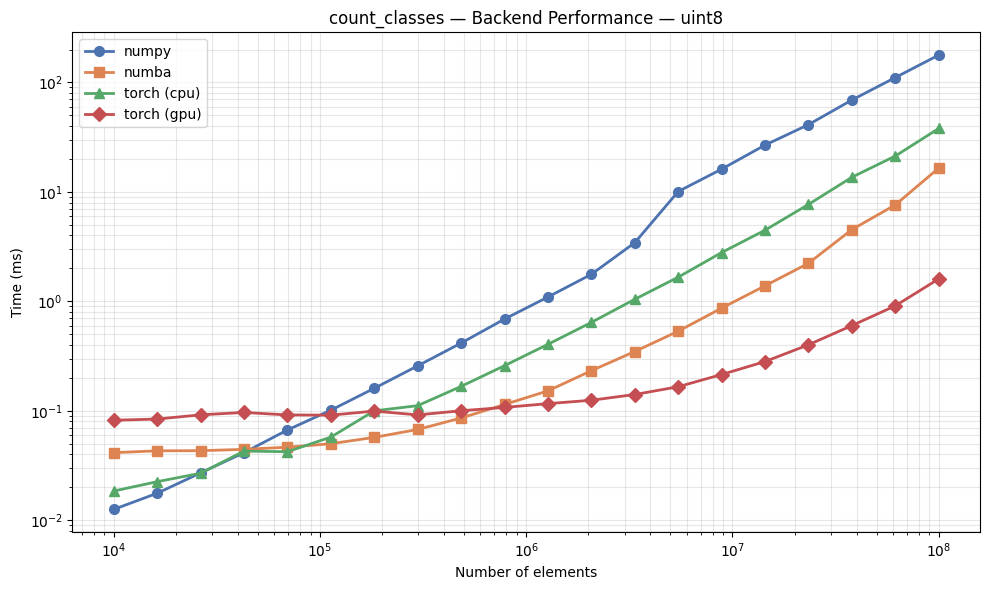
The step in the Numba line at about 1M elements is deliberate. Below 1M elements Numba counts on a single thread: on an idle machine that is slightly slower than using every core, but on a busy one a multithreaded call can stall for 20–100 ms waiting for its threads to get CPU time, while a single thread finishes in under a millisecond.
Run the included benchmark notebook to compare backends on your hardware.
See Examples.ipynb for a walkthrough of all features including name mapping, percentages, PyTorch tensors, and GPU acceleration.
Contributions are welcome! Please:
- Fork the repository
- Create a feature branch (
git checkout -b feature/my-feature) - Install the git hooks:
uv run pre-commit install --hook-type pre-commit --hook-type pre-push(ruff and mypy on commit, tests on push) - Run tests:
uv run pytest - Submit a pull request
See RELEASING.md for how releases are published.
MIT